Seba: Software Architecture
An AI museum guide that recognizes an exhibit from a photo and talks about it · System description · September 2026
1. Overview
Seba is a web-based museum guide. A visitor scans a QR code, opens the app in the phone’s browser (nothing to install), photographs an exhibit and hears a short spoken introduction. They can then keep asking questions by tapping suggestions, typing or speaking. Staff register an exhibit by uploading reference photos and writing a description; the exhibit is recognizable as soon as its first photo is saved.
The system is a conventional three-tier design (Figure 1): web clients, a small PHP application server, and two external AI services. It was shaped by four goals: no install or account for visitors; staff can add or correct an exhibit in minutes without a developer; answers grounded in the museum’s own text rather than the model’s general knowledge (configurable per venue); and inexpensive hosting with plain PHP, no database and no build step.
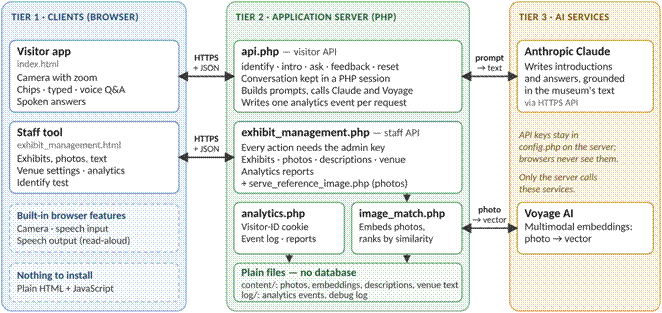
Figure 1. The three tiers. Browsers never talk to the AI services; every AI call is made by the server.
2. The three tiers
Tier 1: Clients (browser). Two single-file web apps in plain HTML, CSS and JavaScript. The visitor app (index.html) captures a photo with the phone camera (using the camera’s own zoom where the browser offers it, otherwise digital zoom), shows the conversation, offers 2–3 suggested follow-up questions after every answer, and lets the visitor choose age group, knowledge level, response length and language (English, German, French, Spanish). Voice input and read-aloud use the browser’s built-in speech features; the Speak button is hidden on browsers known not to support voice input (such as Firefox) and wherever the venue turns voice off, and typing and suggestions still work. The staff tool (exhibit_management.html) manages exhibits (add, photos, description, rename, delete), tests photo matching without involving Claude (Identify), edits venue settings (welcome text, background theme, options) and shows an Analytics report. It requires an admin key.
Tier 2: Application server (PHP). A few scripts on ordinary web hosting, with no framework, database or background workers:
· api.phpis the visitor API (venue_info, identify, generate_intro, ask, feedback, reset). Each visitor’s current exhibit, conversation history and prepared prompt text live in a PHP session.
· image_match.phpsends photos to Voyage for embedding and ranks exhibits by similarity to the stored reference embeddings. The store is a JSON file, cached in memory when APCu is available.
· exhibit_management.php and serve_reference_image.phpare the staff API. Every request needs the admin key. Uploads are validated by content (JPEG, PNG, WebP, GIF), saved under a content-hash filename, checked for exact and near duplicates, embedded, and written to the store under a file lock.
· analytics.phpissues a random visitor-ID cookie, appends one event line per visitor request and computes reports on demand from that log. config.php holds the API keys, model names and admin key.
Tier 3: AI services. Both are called only by the server, over HTTPS. Voyage AI’s multimodal embedding model (voyage-multimodal-3.5) turns a photo into a vector, once per reference photo and once per visitor photo. Anthropic Claude (model chosen in config.php) writes every introduction and answer. The instructions plus venue and exhibit text go in as cached prompt blocks and the visitor’s preferences as a small uncached block, so repeated turns stay fast and inexpensive.
3. Main flows
1. Identify. The phone sends the photo to api.php. The server embeds it and scores each exhibit by its most similar reference photo. A match is accepted only if the top score reaches a minimum and leads the runner-up by enough for its score band (by default: 45% with a 5-point lead, 60% with 4, 75% with 3); otherwise the visitor is asked to retry and is shown the best guess. These six numbers are venue settings that staff change in the Venue tab (stored in venueOptions.txt). A visitor who retries the same top candidate gets a smaller required lead on each consecutive attempt (down to a floor), tracked per browser session and cleared on any success or a different top candidate - aimed at the common case of a slightly awkward angle or light, without loosening the bar for a first attempt.
2. Introduce. generate_intro builds the prompt from the venue theme, the exhibit description and the visitor’s preferences, calls Claude, splits the reply into spoken text and suggested questions, and starts a fresh conversation for that exhibit.
3. Follow up. ask adds the question to the session history and calls Claude again; each reply brings new suggestions. Whether a question came from a suggestion, voice or typing is reported for analytics only.
4. Add or change an exhibit. Staff upload photos (file, drag-and-drop, paste or camera). The server embeds and stores them, so the exhibit is recognizable at once. A description is saved as plain text. No training or redeployment is involved.
5. Analytics. Every visitor request appends one JSON line (visitor ID, time, action, exhibit, result). For a date range chosen in the Analytics tab, the server works out sessions, identification failure rate, exhibit views, question types and time spent per exhibit.
4. Data and state
|
Data |
Where it lives |
Written by |
Used by |
|
Exhibits and photo embeddings |
content/embeddings.json |
Staff API |
Visitor API (matching) |
|
Reference photos |
content/references/<exhibit>/ |
Staff API |
Staff tool (display) |
|
Descriptions; venue header, theme, options |
content/*.txt |
Staff API |
Visitor API (prompts, settings) |
|
Conversation state |
PHP session |
Visitor API |
Visitor API |
|
Analytics events |
log/analytics.jsonl |
Visitor API |
Staff API (Analytics tab) |
|
Debug log |
log/poc.log |
Both APIs |
Developer |
5. Security, privacy and operations
· Secrets stay on the server. The admin key guards every staff action and every reference-photo request; API keys never reach a browser.
· Cookies. A PHP session cookie and a random visitor-ID cookie, both HttpOnly, Secure and SameSite=Lax. The visitor cookie holds only the ID. The analytics log stores no IP address, question text or photo. (The debug log does record IP addresses and questions, so it must not be web-readable.)
· Concurrency. Writes to the exhibit store take an exclusive file lock and are saved atomically, so readers never see a half-written store.
· Deployment. Copy the files to a PHP host with HTTPS (required for camera, microphone and secure cookies), fill in config.php and make sure content/ and log/ are writable by PHP. A nightly script (refresh_demo.sh) can rebuild a sandboxed demo copy for trials.
6. Trade-offs and known limits
· Recognition depends on reference photos. Each exhibit needs several varied photos; look-alike exhibits, glare and poor light can produce “not confident” results or, rarely, a confident mistake. Matching compares every reference embedding in PHP, which suits museum scale (hundreds to low thousands of photos); larger collections would need an index.
· Files keep hosting simple but limit scale. An installation is tied to one server and one venue, and heavy concurrent administration is not a design goal.
· Two external dependencies. Each identification needs one embedding call and each answer one Claude call, so latency is seconds, cost grows with use, and there is no offline mode.
· Voice depends on the browser. Speech input works in Chrome on Android and Safari on iPhone but not in every browser, and the quality of read-aloud voices is whatever the phone provides.
· Growth path. A database or vector index for large collections, multi-venue support, individual staff logins and streamed responses.