Seba Tech Note: Exhibit Recognition by Image Matching
Overview
Seba identifies an exhibit by comparing a visitor's photo with reference photos of every exhibit, and it accepts the match only when one exhibit clearly stands out from the rest.
1. The visitor frames the object in the camera, zooming in if
needed, and takes a photo.
2. The server sends the photo to a Voyage AI model, which
returns an embedding: a list of 1,024 numbers describing what the picture
shows.
3. Seba compares that embedding with the stored embeddings of
every reference photo, using cosine similarity.
4. Each exhibit is scored by its best-matching reference photo,
and the exhibits are ranked.
5. A confidence check looks at the top score and at the lead
over the runner-up. If both are good enough, Seba starts the introduction. If
not, the visitor is asked to pick from a short list or retake the photo.
No text on the label is needed for this route; the object itself is the key.
Reference pictures
Every exhibit needs a set of reference photos, because the visitor's photo can only be matched to something Seba has already seen.
Staff capture and upload the photos using the Exhibit Management tool. About 5 images from different angles will suffice. It may help to add more photos if the images are moved. Stock pictures of the exhibits, as shown on the Museum web site are also loaded. Though these will probably not match pictures taken by visitors, they are useful if someone tries to match an image on the web site.
Each photo is embedded once, when it is uploaded (as a "document" in Voyage's terms), and the resulting vector is stored together with its length. Only the visitor's own photo is embedded at scan time (as a "query").
An exhibit is scored by its best reference photo, not an average. One photo that looks like what the visitor sees is enough, so extra photos only ever help. This is why several photos taken from different angles, distances and lighting conditions work well.
Good reference photos fill the frame with the object, show it from the angles a visitor will actually stand at, and avoid cluttered backgrounds and glare. When two exhibits are near-identical (the duplicate Pou vessels, the two Aspara entries), no number of photos can separate them. In that case the exhibits should be merged, or told apart by something visible in the photo.
Framing the photo:
zoom in on the object
The model describes everything in the picture, not just the exhibit, so the exhibit should fill as much of the frame as possible.
An embedding summarises the whole image. A wide shot of a gallery wall contributes the neighbouring objects, the case, the lighting and the floor to the vector, and the exhibit is only part of what is described. The reference photos are close-ups of one object, so a tight shot of the same object produces a vector that points in nearly the same direction, and a loose shot drifts away from it, towards whatever else is in view. Interestingly, if a visitor includes two exhibits in a shot, then Seba can identify both and ask the visitor to select one.
Resolution makes this worse. The photos sent from the app are small. An object that fills a quarter of the frame is therefore described by roughly 77,000 pixels, and a small object in a wide shot has even less detail to work with.
Seba's camera screen has a zoom control from 1× to 4× (pinch or slider). It uses the phone's own camera zoom when the phone offers one, which keeps full detail, and digital zoom otherwise. Either way the captured photo is cropped to exactly what was visible on screen, so what the visitor frames is what the model sees.
Framing advice for visitors:
- Zoom in until the object nearly
fills the screen, and keep it centred.
- Photograph one object at a
time, and avoid placing it beside a similar-looking neighbour.
- Avoid glare on glass cases, and
step to one side if a reflection covers the object.
- If the app asks for another
try, change the angle, zoom or distance rather than repeating the same
shot.
Embedding vectors:
a picture turned into coordinates
An embedding is a list of numbers that places a picture at a point in a space where pictures with similar content sit close together.
Think of a map. A city has two coordinates, latitude and longitude, and cities that are near each other on the ground have similar coordinates. An embedding model does the same for images, but with 1,024 coordinates instead of two. Nobody chose what each coordinate means. The model learned, from a very large number of pictures and captions, to arrange the space so that pictures of similar things end up in similar places: two photos of the same bronze vessel land close together, and a photo of a seated Buddha lands far from both.
Three properties make this useful for Seba:
- It captures content, not
pixels. Two photos of the same statue
from slightly different angles have very different pixels but similar
vectors.
- Comparison is arithmetic. Once every photo is a list of numbers, "how alike
are these two pictures?" becomes a calculation that takes a fraction
of a millisecond.
- The reference vectors are
computed once. The expensive step, the call
to the model, happens when staff upload a reference photo and again for
each visitor photo (about 340 ms median). The rest of the request,
including comparing against all stored vectors, took a median of about 120
ms, for a total of about 460 ms.
The model does not know what an exhibit is called. It only knows which pictures look alike. The name comes from the reference photo that the visitor's photo lands closest to.
Nearest neighbor
and cosine similarity
Seba finds the exhibit whose reference photo points in nearly the same direction as the visitor's photo, and measures "nearly the same direction" as the angle between the two vectors.
Picture each embedding as an arrow from the origin. Two arrows that point the same way have an angle of 0° between them, and the pictures mean the same thing. Arrows at right angles (90°) have nothing in common. The length of an arrow carries little meaning, so Seba ignores it and compares direction only.
The angle is calculated through its cosine, which turns the angle into a number between 0 and 1 for these image vectors:
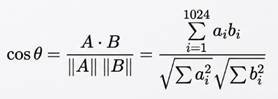
The top line, A·B, is the dot product: multiply the two vectors coordinate by coordinate and add the results. The bottom line divides by the two vectors' lengths, so only the direction is left. The length of every reference vector is stored when the photo is uploaded, so it is not recalculated for each scan.
A two-number example shows the idea. Real embeddings do the same sum over 1,024 numbers.
|
Pair |
A · B |
Lengths |
cos θ |
Angle θ |
|
A = (3, 4), B = (4, 3) |
3×4 + 4×3 = 24 |
5 and 5 |
24 / 25 = 0.96 |
16° |
|
A = (3, 4), C = (−4, 3) |
3×(−4) + 4×3 = 0 |
5 and 5 |
0 |
90° |
A higher cosine means a smaller angle and a better match. For reference, a score of 0.88 is an angle of about 28°, 0.75 is about 41°, and the minimum score Seba accepts at all, 0.45, is about 63°.
The nearest-neighbor search is the plain version. Seba computes the cosine between the visitor's vector and every reference photo's vector (no index is used). Each exhibit's score is the highest cosine among its own photos, and the exhibits are sorted by that score. The exhibit at the top is the nearest neighbor.
The score is not a percentage of certainty. The app prints it as a percentage in its retry message, but 0.73 does not mean "73% sure". It is only a position on the cosine scale. That is why Seba also looks at the lead over the runner-up.
Confidence: score
threshold and margin
Seba accepts the top exhibit only if its score clears a floor and its lead over the second-best exhibit is large enough; otherwise it treats the photo as uncertain.
The lead is called the margin: the top exhibit's score minus the best score of any other exhibit. Photos of the same exhibit do not compete with each other, because each exhibit is scored once, by its best photo. The margin matters more than the score because a wrong answer usually has a close runner-up, while a correct one stands clear. A high score alone is not proof: a wrong match can reach 0.85.
There are two checks, applied in order:
1. Score floor.
The top score must be at least 0.45. Below that, the photo is not close to
anything Seba knows.
2. Margin. The lead
must be at least the required margin, which depends on the top score. A strong
score is itself good evidence, so it needs a smaller lead.
|
Top score |
Required margin |
Match |
|
0.45 to below 0.60 |
0.05 |
Floor band |
|
0.60 to below 0.75 |
0.04 |
Better |
|
0.75 and above |
0.03 |
Best |
If the photo fails, the visitor sees the "could not confidently match" message and a short list of the closest candidates with small thumbnails, so a near miss costs one tap. In the test, every wrong first choice that was rejected had the correct exhibit as the runner-up.
Two more rules adjust the margin:
- Retries relax it. When the same exhibit stays on top across consecutive
failed attempts, the required margin drops by 0.01 per retry, down to a
floor of 0.01 and for at most five retries. A visitor who keeps aiming at
the right object gets through, but a different top exhibit on the next
attempt resets the relaxation.
- The venue can change the
numbers. The floor, the three margins
and the score values shown above are defaults that a venue can override
them using the Exhibit Management app.
Three attempts from an actual test show how the rules play out:
|
Photo of |
Top score (exhibit) |
Runner-up |
Margin |
Required |
Result |
|
Female tomb attendant |
0.902 (correct) |
0.738 |
0.164 |
0.03 |
Accepted, correct |
|
Sword Bearer Lamp |
0.728 (Standing female figure) |
0.699 (Sword Bearer Lamp) |
0.029 |
0.04 |
Rejected; right answer was the runner-up |
|
Aspara, mid-6th century |
0.824 (Disciple of Buddha) |
0.756 (Aspara) |
0.069 |
0.03 |
Accepted, wrong |
The last row is the limit of the method. A margin test catches close calls, but it cannot catch an exhibit that has too few reference photos and is confidently outscored by a look-alike. That needs more reference photos, not different thresholds.
All in fun
--Raj