Seba — AI Model Selection Design Note
Purpose
Seba can pick between Claude Haiku 4.5 and Claude Sonnet 5.5 AI systems for each request, trading response speed against writing quality. While Sonnet provides better responses, Haiku is faster and much less expensive. The observed difference is a response time of 2 seconds for Haiku vs. a noticeable 4 seconds for Sonnet. Opus seemed to be about as fast as Sonnet, but costs much more. This note describes the routing rules, and adds two adaptive preference mechanisms that let Seba quietly adjust a visitor's Knowledge Level and Response Length based on how they're actually using the guide — with those adjustments feeding back into which model gets picked. The note is not about AI tech, but more about how to use it in real applications.
Three principles carried through from the earlier discussion: static, explainable rules ship first; anything stateful or adaptive gets a precise, reasoned threshold rather than an arbitrary one; and nothing adaptive touches Age Group or Language, which the visitor sets once and Seba never changes.
Model selection
decision tree
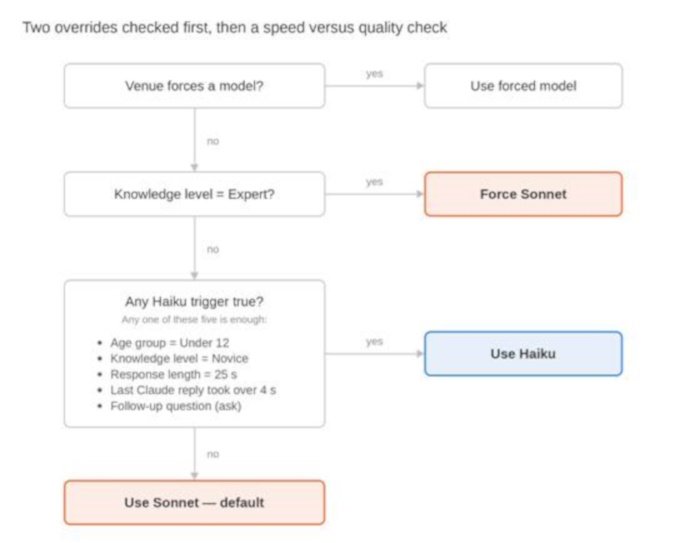
Two hard overrides are checked first; only if neither applies does the five-condition speed-versus-quality check run.
Overrides, checked in order:
1. A venue-level model override, if one is configured, wins outright. The venue director can specify a model using the Exhibit Management app.
2. Knowledge Level — current, not necessarily as originally selected — equal to Expert forces Sonnet, regardless of every other condition.
Otherwise, any one of these five conditions is enough to prefer Haiku:
1. Age Group is Under 12.
2. Knowledge Level is Novice.
3. Response Length is 25 seconds, the longest available — output length is the biggest latency driver measured in production, so the longest responses benefit most from the faster model.
4. The most recent Claude response in this session took longer than 4 seconds.
5. The request is a follow-up question (ask), not the initial introduction (generate_intro) — conversational back-and-forth benefits from a snappy pace more than the one piece of content per exhibit worth spending the extra time on.
Otherwise: prefer Sonnet, the default.
Adaptive knowledge
level
Seba tags each follow-up answer with how the visitor's question compared to their current Knowledge Level, then watches for a run of three consecutive questions pointing the same direction before adjusting.
Detecting the signal. The ask response from the LLM carries a <suggestions> block that Seba strips before showing the answer. The same mechanism carries a <question_level> tag — below, at, or above — reflecting whether the question was simpler or more advanced than the current level's content is written for.
Quantifying “consistently”: three in a row, same direction. One off-level question is not a pattern — a Novice-level visitor asking one unusually sharp question, or an Expert idly asking something basic, is normal variation, not drift. Three consecutive questions pointing the same direction is a much rarer coincidence than one or two, and is a deliberately higher bar than a two-signal threshold would be — it will trigger less often within a typical visit (most sessions run two to four follow-ups total), favoring confidence over responsiveness. A single at question resets the streak to zero, and a direction-reversing question restarts it at one in the new direction — the counter tracks a run, not a cumulative tally.
Adjusting. Three consecutive below signals drop one level (Expert → Aware of subject → Novice); three consecutive above raise one level. Novice is the floor and Expert is the ceiling — a further signal in that direction simply has nowhere to go. After any adjustment, the streak resets, so a second shift needs its own fresh set of three.
Resetting on manual change. If the visitor opens Preferences and picks a Knowledge Level themselves, that becomes the new baseline and the streak counter clears — Seba doesn't try to immediately correct a visitor who just told it what they want.
Adaptive response
length
Seba watches for early interruptions of its own spoken answers and shortens the target length after a consistent pattern of them.
Detecting the signal. The client already knows when speech synthesis is still playing. If the visitor taps Stop, or taps Touch to Speak again (which stops current playback to start a new question), while TTS is still mid-sentence, that's a candidate signal. Not every interruption means “too long,” though — someone who interrupts in the last moment of a response has essentially heard all of it. The signal only counts if the interruption lands before roughly 70% of the expected speaking time has elapsed (estimated from the selected Response Length itself, since that's the target duration the response was written to). That 70% figure is a starting point to validate against real sessions once this is built, not a fixed constant.
Quantifying “consistently”: three in a row, same as Knowledge Level — one early interruption could be an accidental tap, a distraction, or the visitor simply moving to a different exhibit mid-thought. Three consecutive early interruptions is a much stronger signal that the response length itself isn't matching what this visitor wants, at the cost of needing more interactions to trigger than a two-signal threshold would have.
Adjusting. Three consecutive early interruptions step the Response Length down one notch (25 → 20 → 15). Fifteen seconds is the floor. The streak resets after an adjustment, and resets on a manual change in Preferences, exactly as with Knowledge Level.
This mechanism only ever shortens. Nothing in the visitor's behavior signals “I want longer answers” the way a question's sophistication signals Knowledge Level — so there's no adaptive up-shift for Response Length, only down. The visitor can always manually select longer responses.
Session state and
visibility
Where this lives. Both adaptive values, and their streak counters, live in the same PHP session Seba already uses to track the current exhibit —two session keys (current Knowledge Level, current Response Length) plus their streak counters and direction. This state is per-visit; it does not persist across a “New Visitor” reset or between separate visits.
Showing it in Preferences. The Knowledge Level and Response Length controls in the visitor's Seba Exhibit Guide Preferences panel read from this same session state, not from whatever was first selected. If Seba has adjusted either one, the next time the visitor scrolls back to display the Preferences, the dropdown already shows the current (adjusted) value — nothing is hidden or silently different from what the visitor sees. There is no active notification (a toast or banner) when an adjustment happens.
Manual override. The visitor can always reselect either value by hand. Doing so both updates the active preference immediately and resets that preference's streak counter, as noted above.
Open questions,
deferred for later
Rolling average for the up-shift back to Sonnet. The down-shift to Haiku on a slow Claude response (over 4 seconds) is immediate — a single slow response is enough, no streak required, since a visitor already waiting too long shouldn't need to prove it twice. Whether and how Seba should ever shift back up to Sonnet later in the same session, once things speed up, is still to be determined based on visitor feedback. A rolling average of recent response times is the likely shape of that rule (smoother than reacting to any single fast response, and avoids flapping back and forth), but the window size, and whether an up-shift should happen at all within one visit, needs its own pass.
Non-English language as a routing factor. Whether Haiku's writing quality holds up as well in German, French, Spanish, or Mandarin as it does in English is untested. If it doesn't, Language might belong as a sixth Haiku-avoidance condition (prefer Sonnet for non-English responses) rather than a Haiku trigger. This needs real comparison samples in each supported language before it's worth a rule either way.